Welcome to my exocortex: my digital mind prosthesis.
I'm building toward an ecosystem of apps that share information and can use any LLM as a personal life assistant, a memory and orchestration layer, and a research tool.
In short: a personal assistant that remembers things for me and helps me make sense of them.
Why I build
I have a PhD in plant biology from UC Berkeley, where I studied how microbes shape soil and plant health. Soil is the foundation that the human ecosystem springs from, and our lives currently depend on it to sustain us as we race towards the future. In this vein, I want to use AI to help me live a healthier life that is in better harmony with the systems and ecologies I am embedded in.
My memory layer and custom UI catch what I'd otherwise hold in my head and turn it into lists and finished tasks; together they enhance my memory to something I like to think is more than human. The rule I build by: a tool should give to my life and not take from it. It gathers and holds, organizes itself into my metaphysical meadow of thoughts that I collectively call my exocortex, and gives me more free cognition to live my life more fully. I want to use this extra time and energy to divert my attention towards things I really care about, such as learning how to live an optimally healthy, sustainable, and comfortable lifestyle. Or, at least, that's how I justify my vibe coding addiction.
I'm looking to turn my interest in creating and visualizing complex systems into a career in software engineering. This portfolio shows what I care about, and building it is teaching me how modern software engineering can serve my research interests and make personalized software I use every day.
How I build
I am an AI-native engineer who has moved beyond vibe coding into agent orchestration. Working with LLMs has allowed me to create a full personal knowledge system and a suite of visualization tools. I use that tooling to learn more about the architecture, so I can create precise, inviting, and useful systems that enhance everyday life.
This method is the one I learned studying soil: mix up some mud, see what grows, scry out the patterns that arise, and let the structure teach me about itself so I can build more and get back.
If my work resonates with you, I'd love to hear from you!
Languages and tech stack
| Area | Built with |
|---|---|
| Languages | Python, TypeScript, SQL, CSS |
| Front end | React, Vite, TanStack Router and Query, D3, Leaflet, ELK, Shiki, PDF.js, ZXing, PWA |
| Back end | Flask, Gunicorn, gevent, SQLite with FTS5 search, pandas, SciPy, Web Push |
| AI agents | Claude Code run headless, with a personal orchestration and memory layer using various Claude models |
| Testing | pytest, Vitest, TypeScript type checks |
| Running it | Linux, nginx, systemd, cron, shell scripts, Let's Encrypt, Cloudflare, Hetzner, tmux, ttyd, Tailscale, GitHub |
| Also used | PostgreSQL, Drizzle, Hono, Zod, pnpm, Elixir (on other projects) |
Terrain
A living map of a codebase.
I'm a very shape-rotatey person: I understand things by seeing their structure. While building a large system with AI, I needed to see inside it, so I made Terrain. Every file is a dot, glowing where work just happened, with AI sessions orbiting the files they touch.
It has since become a set of rooms I use to visualize my codebase as it grows. Two of them are open to visitors: the file map here, and the Observatory map further down.
Explore it live → Real code opens; personal files stay private.

Observatory
How I orchestrate.
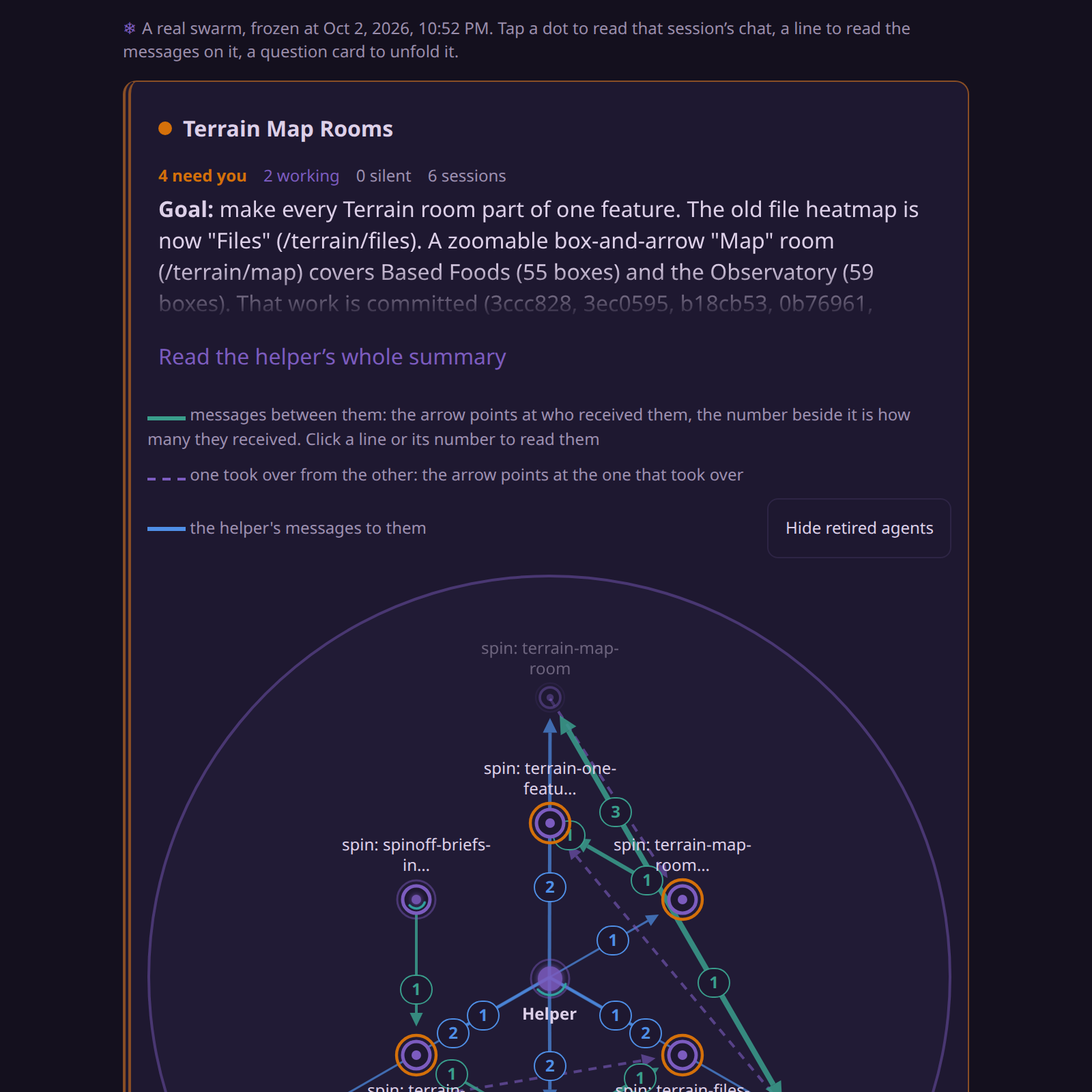
I started out building in single sessions, and it got complicated: which one was open, which one needed me, which two were overlapping. So I made a helper. It never builds. It keeps up with everything, looks things up, hands out tasks, and tells agents when they overlap so they can message each other. Now I can add several features at once without them colliding.
Below is a real swarm, frozen mid-work: six sessions building the Terrain rooms on this site, with their helper in the middle. A spinning dot was working at that moment, and an orange ring was waiting on me. Tap a dot to read that session's chat, or a line to read what the agents said to each other.
How the orchestration works
This is a memory layer and an orchestration layer in a modular UI, which together form a meta-harness that I run on headless Claude Code.
The map is that system the way I'd sketch it. Each box is a part, each arrow says how one part uses another, and a box with parts opens when you tap it.
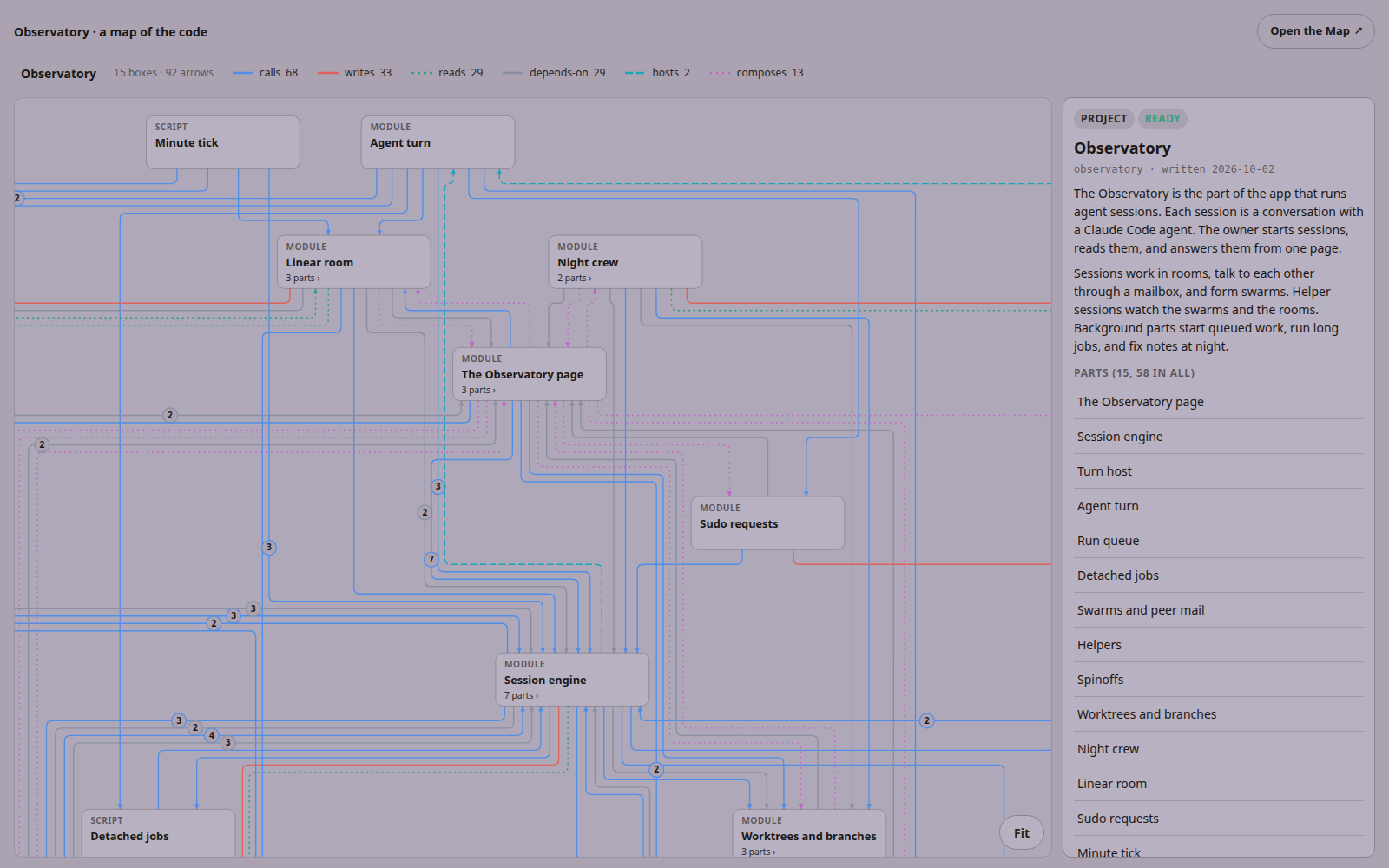
- Sessions and rooms Each session is one conversation with a Claude Code agent. Sessions sit in rooms, and the ones waiting on me sort to the top.
- A mailbox Sessions can message each other. The sender picks how hard to knock: slip the message in, queue it, or interrupt.
- Swarms A swarm forms in two ways. Sessions that message each other are linked into one, and a room helper can declare one by grouping sessions it sees working on the same thing. When the two disagree, the room helper's placement wins.
- Helpers Each swarm has a helper that names it, summarizes what every member is doing, and writes a closing summary checked against what was really committed. A room helper watches a whole room from above: it forms swarms, joins sessions to them, splits them, and releases sessions to work alone, and every move it makes can be undone. Helpers only look things up, and each of their turns starts fresh from a short seed document, so their context never grows.
- Handoffs A session that fills its context writes a handoff, and a fresh session picks the work up inside the same swarm.
- Guard rails Reversible actions go through. Risky ones in rooms I'm not watching stop and wait for my approval. Unattended sessions work in their own copy of the code on their own branch, and nothing merges by itself.
- A minute tick Once a minute a small script keeps everything moving: it delivers waiting messages, wakes the helpers whose sessions changed, and closes what's finished.
Open the swarm → This one swarm is open to read; every other session stays private.
Ecosystem
Where a dinner comes from.
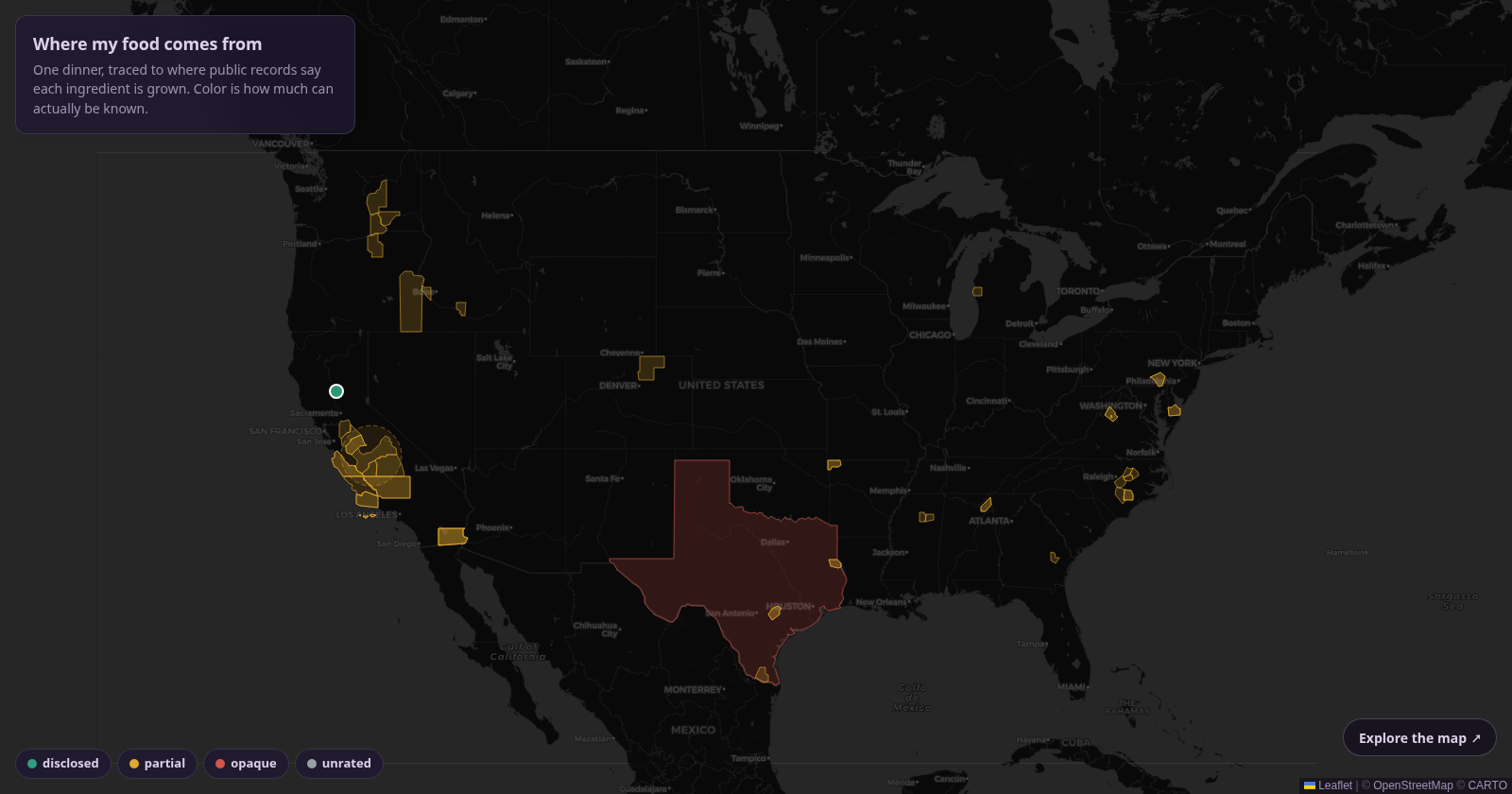
One meal, traced to where public records say each ingredient is grown. Every source is a dot or a county outline, and its color is how much can actually be known about it. It's the first piece of a bigger map.
I'm interested in where personal health and soil health meet, as I have found that these goals are in tight symbiosis. After covid I had gut inflammation and needed to find clean foods to eat, so I started tracing where my food comes from.
This is a demo prototype of an app I am building called Based Foods, which will allow people like me to filter for recipes that keep them healthy. Every food links to the sources it's traced to. An agent proposes new sources, and I check each one against the document that backs it. It also tracks nutrition: meals in grams against the recommended intakes, using USDA's food data, with packaged foods found by name, barcode or camera scan.
Eventually, I want to make it easier to choose regenerative products by making supply chains visible: where your shampoo, your food and your furniture come from, and what they cost the ground.
Follow the chain → Real sources, real records; the rest of my kitchen stays private.
Journal
My personal memory layer.
I got tired of explaining my life to every new agent. So I built a journal that remembers it. It keeps track of people and threads, and when I name one while working, my recent notes about them load into the conversation. In the background it assigns topics by subject on its own, so I can visualize them in my journal. My real journal stays private, so this demo runs on an invented one.
I use it to remember commitments, draft emails, stay on task, and recall things I'd forgotten.
Try the demo → Every person and word in it is made up.

How the journal works
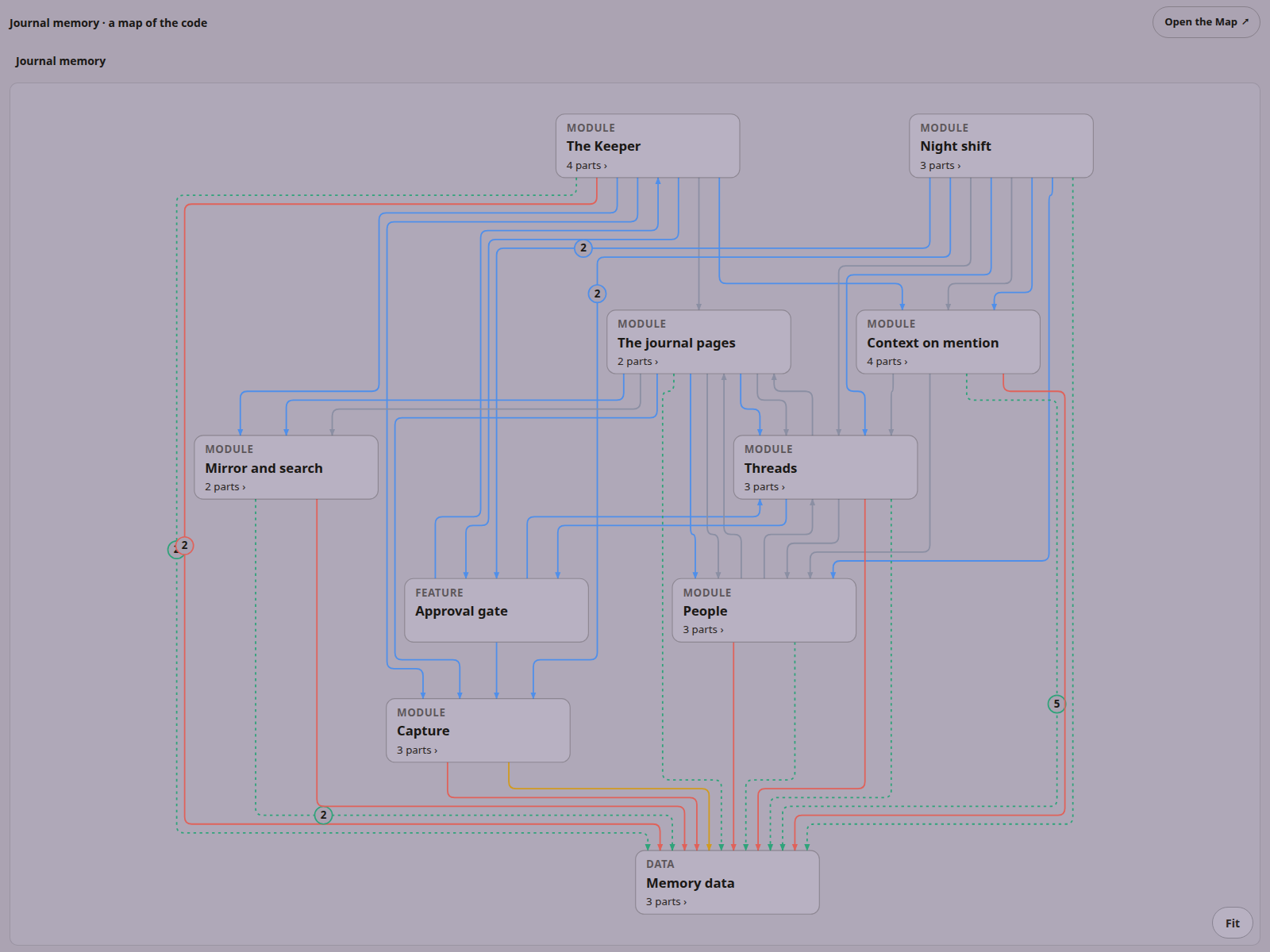
- People When I tap a name, I see every time I've mentioned that person and what I said.
- Threads When I tap a thread, I see every entry tagged with that subject, so I can keep track of when I've thought about a topic and what I thought.
- Context on mention When I name a person or a thread while working with an agent, my recent notes about them load into the conversation.
- Topics Entries are assigned topics by subject automatically, in the background, so I can visualize them in my journal.
- Search and photos I can search every entry by keyword, and add photos.
- Edits I can edit an entry without losing what it used to say: the old text is kept and the edit is marked.
- Night tending Each night an agent tends every thread on its own, so the short facts stay current.
The map below is the memory system itself, drawn the same way as the orchestration map: how a line I say becomes a card, how night agents file it under people and threads, and how the right cards come back when I name someone.